
- Specifications
- Parts Identification
- Menu screen
- Control white
- Control color
- Master and Cross
- Control effects
- DMX / Universe number
- Slot and Setup
- Broadcaster & Audience function
- FCC / KC / MIC informations
- Warranty
- Battery
“Regulatory information including FCC ID, MIC ID and KC ID is available on the LCD display. Please check: Menu → Information → About.”

Specifications
- 15W Wide full spectrum portable lite
- Wavelength range 440nm – 660nm
- CLAID 5-LED engine
- CCT range: 1,700k – 20,000k
- CRI: 96 – 98 (R9 and R15 : 95 – 99)
- TCLI: 95 – 99
- TM-30: Rf and Rg are close to 100
- CIE1931: The coordinates follow on planckian locus
- Bluetooth and Artnet via WiFi
- Detachable battery (Supports standalone battery charging)
- Foldable or magnetic diffuser (Optional)
- Magnetic grid (Optional)
- Charger: USB-PD (Supports 5V-12V)
- If you want to turn on the light while charging the battery, you must use a USB-PD 12V adapter that provides at least 25W. This is because the charger needs to supply enough current for both charging and powering the light at the same time. Using an underpowered charger may cause performance issues.
- However, if the light is turned off and you are only charging the battery, you may use a USB 5V charger of 10W or lower.
- 2 Hours runtime without charging
- Memory slot from A to F
- 3 pixels effects
- Online upgrade using wifi connection
- Lumen radio (Optional)
- Lampora App (iOS and Android)

- a. USB-C
- USB-PD Charging port
- b. F1
- Press and Hold : Power On/Off
- Press : Vertical flip screen for left handed or right handed
- Dial : Control the gauge on the screen
- c. F2
- Press and Hold : Special function on the menu
- Press : Switch tab on the menu
- Dial : Change the menu
- d. 1/4inch Nut hole
- Mount tripod or foldable diffuser
- e. 4 corner magnetics
- Mount magnetic grid or magnetic diffuser

- a. Full color LCD screen
- b. Detachable battery cover
- c. Battery cover lock-clip
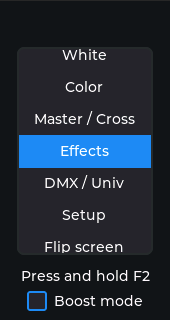
- F2 Dial and Press: Select menu
- White : White LED Mode – Control Intensity, CCT, Green/Margenta
- Color : Color LED Mode – Control Intensity, Hue, Satuation
- Master / Cross : Mix white and color
- Effects : Choose from various effects – Control Intensity, speed
- DMX / Univ : Choose DMX channel, Universe number, charts, bits
- Setup : Select slot, Setup radio and firmware upgrade
- Flip screen : Vertical flip of the screen
- Infomations : App QR, Manual QR, Informations
- F2 Press and hold : Turn on/off boost mode, In Boost mode, the device delivers higher output for increased brightness. It will automatically power down if the battery temperature rises above 60°C.
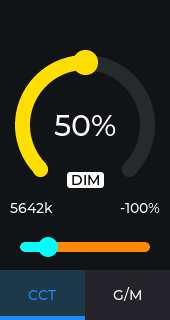
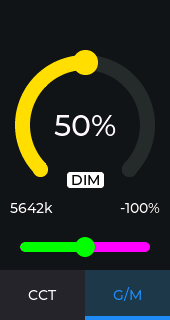
- F2 Dial : Change Intensity of white (0% – 100%)
- F1 Press : Switch CCT <-> G/M
- F1 Dial : Change CCT or G/M
- F2 Press : Return to main menu
- F2 Press and Hold : Turn on/off boost mode
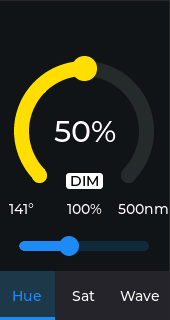
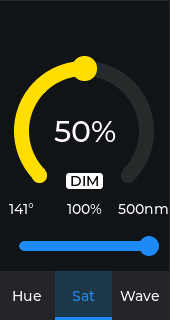
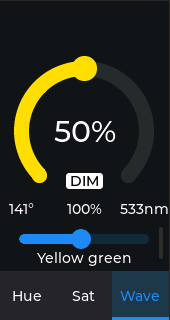
- F2 Dial : Change Intensity of color (0% – 100%)
- F1 Press : Switch Hue <-> Saturation <-> Presets
- F1 Dial : Change Hue, Saturation and Presets based on wavelenth
- F2 Press : Return to main menu
- F2 Press and Hold : Turn on/off boost mode
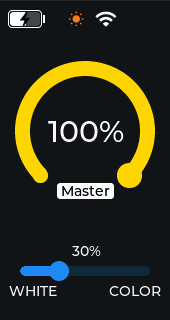
- F2 Dial : Change intensity of master (0% – 100%)
- F1 Dial : Change cross fade between white and color modes
- F2 Press : Return to main menu
- F2 Press and Hold : Turn on/off boost mode
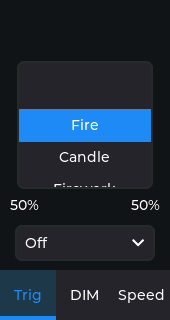
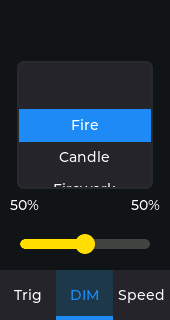
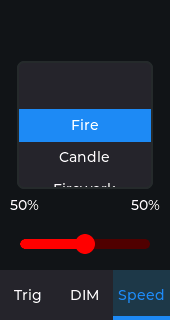
- F2 Dial : Choose effect
- F1 Press : Switch trig <-> intensity <-> speed
- F1 Dial :
- Trig: Off <-> On <-> Blackout
- DIM: Change intensity of effect
- Speed: Change intensity of speed
- F2 Press : Return to main menu
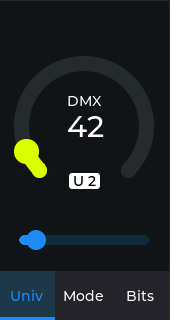
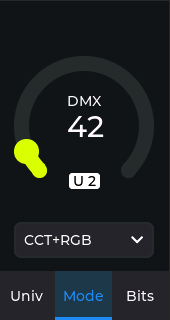

- F2 Dial : Select DMX Channel
- F1 Press : Switch universe number <-> chart mode <-> bits (8 or 16 bits)
- To use Art-Net, DMX channel and universe number must be configured. The DMX chart supports various modes.
- In Pixels mode, the fixture can be controlled as three separate pixels.
- F1 Dial : Select universe number, chart mode and bits
- F2 Press : Return to main menu

- F2 Dial : Select Slot (A – F)
- F1 Dial :
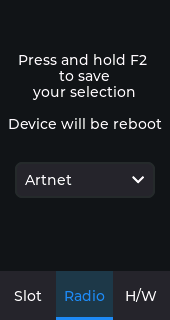
- Radio: Off, Bluetooth, Artnet, Lumen, Broadcaster, Audience
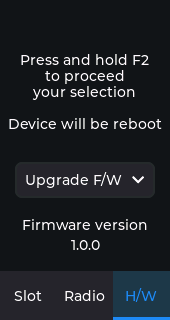
- H/W: Upgrade F/W, Revert F/W, Factory Reset, Lumen Reset, English, Korean, Japanese
- F1 Press : Switch slot <-> radio <-> hardware
- The slot functions as a memory for storing the current lighting settings. Slots A to F are available, and the stored configuration is preserved even after power-off.
- Bluetooth allows control via the dedicated app, and Art-Net can be used through a Wi-Fi connection.
- You can configure the Wi-Fi access point settings using the Bluetooth control app.
- Remote firmware upgrades are available when the device is connected to Wi-Fi. Selecting ‘Revert F/W’ allows you to revert the upgrade immediately. Wi-Fi connection requires the device to be set to Art-Net mode.
- Factory reset can erase wifi parameters
- Lumen reset can erase lumen radio sync
- You can select UI language
- F2 Press and hold : Save your selection of radio or firmware and reboot
- F2 Press : Return to main menu
- Broadcaster & Audience function
- When multiple units are used, one can be set as the Broadcaster and the others as Audience, allowing the Broadcaster to control them so that all Audience units operate identically. Since communication uses Bluetooth, transmission delays may occur.
- In this case, the Broadcaster and Audience must use the same DMX channel and Universe number.
- This is useful when you want to control multiple units but don’t have access to LumenRadio or a mobile app.
- Setup -> Radio -> Broadcaster or Audience
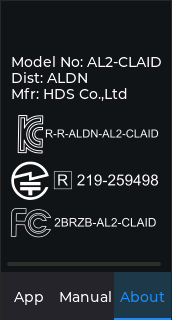
- Main menu -> Informations -> About
- You can see FCC ID, KC ID and MIC ID
- and other informations
Warranty
- We offer a one-year free warranty period after purchased and you can continually get a warranty service with extra charge after expired free warranty period
- We do not guarantee the service for free of charge in case of below even though it is within free warranty period
- Product failure due to consumer negligence
- Product failure due to power trouble that we did not allow
- Product failure due to disassembling by unofficial facilities that we did not allow
- Product failure due to natural disaster
www.aladdin-lights.com / tel. +82-2-710-5518
FCC Statement
- This equipment has been tested and found to comply with the limits for a Class B digital device, pursuant to part 15 of the FCC Rules.
- These limits are designed to provide reasonable protection against harmful interference in a residential installation.
- This equipment generates, uses and can radiate radio frequency energy and, if not installed and used in accordance with the instructions, may cause harmful interference to radio communications.
- However, there is no guarantee that interference will not occur in a particular installation. If this equipment does cause harmful interference to radio or television reception, which can be determined by turning the equipment off and on, the user is encouraged to try to correct the interference by one or more of the following measures:
- Reorient or relocate the receiving antenna.
- Increase the separation between the equipment and receiver.
- Connect the equipment into an outlet on a circuit different from that to which the receiver is connected.
- Consult the dealer or an experienced radio/TV technician for help.
- Caution: Any changes or modifications to this device not explicitly approved by manufacturer could void your authority to operate this equipment.
- This device complies with part 15 of the FCC Rules.
- Operation is subject to the following two conditions: (1) This device may not cause harmful interference, and (2) this device must accept any interference received, including interference that may cause undesired operation.
- RF Exposure Information
This equipment complies with FCC radiation exposure limits set forth for an uncontrolled environment. This equipment should be installed and operated with minimum distance 20cm between the radiator and your body.
Detachable battery
Product appearance

- USB-C Input
- Charging Indicator
- Power Connector
Basic features
- Ultra mini size, maximum energy to volume ratio of the structure
- Equipped with I2C connector, able to read all battery’s information
- Input USB-C 10W
- Output DC12V / 15W
- Intelligent control protection: over-heat, over-charge, over-discharge, and over-current protection.
Specifications
| Model | AL-B20 |
| Battery Capacity | 3.85V/5.0Ah/19.25Wh |
| Battery Output | 12V/15W(Max) |
| Battery Input/USB-C Input | 5~12V/10W(Max) |
| Working Temperature | Discharge: -20℃~70℃ Charge: 0℃~55℃ |
| Storage Temperature | -20℃~+45℃ |
| Dimension/Weight | 95.08*63.18*9.5mm/91g |
Cautions
- Must be used and stored in accordance with the manual
- Please use the original charger or original approved charger
- Do not put battery into water or fire
- Avoid strong impact
- Do not heated or disassemble
- Avoid short-circuit
- Keep away from children
- When the battery needs to be stored for a long period of time, please charge the battery to 50% of its capacity, and charge/discharge the battery every 3 months.
Instructions
- Battery working
- Connect battery with light A-LITE V2, turn on light, light working.
- Battery charging
- Charge the battery separately by USB-C charger
- Charge the battery by USB-C charger through USB-C input on light
- Charging indicator: red – battery in charging, light off – battery full charged.
Storage and transportation
- Storage temperature: -20℃~+25℃ (12 months), -20℃~+45℃ (3 months), -20℃~+60℃ (1 month). Storage humidity:≤75% RH.
- When the battery needs to be stored for a long period of time, please charge the battery to 50% of its capacity, and charge/discharge the battery every 3 months.
- Battery should be stored in a clean, dry, ventilated place, should avoid contact with corrosive substance, and keep away from fire and heat sources.
- Batteries should be packed into boxes for transport which should prevent severe vibration, shock or extrusion, sun exposed and rain. Transportation could be used cars, trains, boats and airplane.
Maintenance
- Battery warranty period is one year.
- Warranty period: from the date of purchase.
- For products failures caused by the following reasons, the Company does not provide the promised warranty service:
- Non our products or out of warranty period.
- Faults arising from using the wrong cable to connect with battery.
- Damage to electrical appliances due to incorrect choice of battery voltage.
- Long-term use of non-original chargers or non-original approved chargers causes performance degradation, inability to charge and full charge phenomenon.
- After a period of battery use, multiple charging and discharging cycles cause a the natural decline in battery capacity.
- Product failure caused by self-disassembly, repair, or dropping.
- Battery damage caused by improper human use.
- Battery pack performance degradation caused by failure to use and store the battery according to the manual, including not charging and discharging the battery at least once every three months and not maintaining a 50% charge during storage.
- Malfunction or component damage caused by force majeure, such as earthquakes, fires, or other natural disasters and unforeseen accidents.